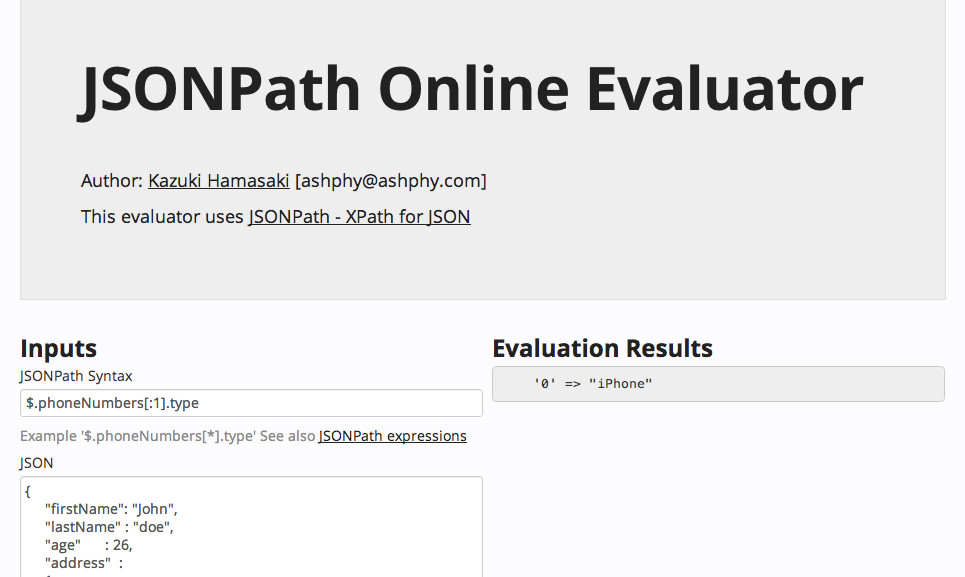
JSONPath Online Evaluator has been released. It’s the only online evaluator in the world for JSONPath.
Put your JSONPath syntax and json data on left pane, and the evaluation results are shown in right pane.
Visit http://bit.ly/jsonpath
JSONPath Online Evaluator has been released. It’s the only online evaluator in the world for JSONPath.
Put your JSONPath syntax and json data on left pane, and the evaluation results are shown in right pane.
Visit http://bit.ly/jsonpath
There is a easy way to delete the file located at FTP server using CFNetwok framework.
After access the server, run the following code.
SInt32 errorCode;
Boolean success = CFURLDestroyResource(url, &errorCode);
CFURLDestroyResource is defined by CFURLAccess.h
Good luck.
Media plugin by David Persson is the easiest way to handle the attached file in CakePHP. However, this plugin has few documents on the web, and its wiki was removed.
This is a tutorial of media plugin. I’m happy if this article helps you.
This turorial used following versions.
After the CakePHP initial setup, download the plugin , and move to the app/plugin, rename the folder to ‘media’. You need to type only this command using git.
git clone git://github.com/davidpersson/media.git app/plugins/media
Add this line to the core.php or bootstrap.php.
require_once(APP.'plugins'.DS.'media'.DS.'config'.DS.'core.php');
Media plugin needs the folders for storing the files. Plugin provides the cake shell. Type this command.
cake media init
chmod -R a+rwX app/webroot/media/{transfar,filter}
Sample Table is located at plugins/media/config/sql/media.php . Type command to create this table.
cake/console/cake schema create media -path app/plugins/media/config/sql/
Table structure is
CREATE TABLE IF NOT EXISTS `attachments` (
    `id` int(10) unsigned NOT NULL auto_increment,
    `model` varchar(255) NOT NULL,
    `foreign_key` int(10) NOT NULL,
    `dirname` varchar(255) default NULL,
    `basename` varchar(255) NOT NULL,
    `checksum` varchar(255) NOT NULL,
    `alternative` varchar(50) default NULL,
    `group` varchar(255) default NULL,
    `created` datetime default NULL,
    `modified` datetime default NULL,
    PRIMARY KEY  (`id`)
);
You can use other table you defined insted of plugin’s sample.
Sample model is located at plugins/media/models/attachement.php , and you can copy this. Media.Transfer Behavior is need to transfer files to the server.
<?php
class Attachment extends AppModel {

  var $name = 'Attachment';
  var $useTable = 'attachments';
  var $actsAs = array(
    'Media.Transfer' => array(
      'trustClient' => false,
      'transferDirectory' => MEDIA_TRANSFER,
      'createDirectory' => true,
      'alternativeFile' => 100
    ),
    'Media.Generator' => array(
      'baseDirectory' => MEDIA_TRANSFER,
      'filterDirectory' => MEDIA_FILTER,
      'createDirectory' => true,
    ),
    'Media.Polymorphic',
      'Media.Coupler' => array(
      'baseDirectory' => MEDIA_TRANSFER
    ),
    'Media.Meta' => array(
      'level' => 2
    )
  );

  var $validate = array(
    'file' => array(
      'resource'   => array('rule' => 'checkResource'),
      'access'     => array('rule' => 'checkAccess'),
      'location'   => array('rule' => array('checkLocation', array(
      MEDIA_TRANSFER, '/tmp/'
    ))),
    'permission' => array('rule' => array('checkPermission', '*')),
    'size'       => array('rule' => array('checkSize', '5M')),
    'pixels'     => array('rule' => array('checkPixels', '1600x1600')),
    'extension'  => array('rule' => array('checkExtension', false, array(
      'jpg', 'jpeg', 'png', 'tif', 'tiff', 'gif', 'pdf', 'tmp'
    ))),
    'mimeType'   => array('rule' => array('checkMimeType', false, array(
      'image/jpeg', 'image/png', 'image/tiff', 'image/gif', 'application/pdf'
    )))),
    'alternative' => array(
    'rule'       => 'checkRepresent',
    'on'         => 'create',
    'required'   => false,
    'allowEmpty' => true,
  ));
}
I created base controller and view with bake command.
Replace default form with following code at view/add.ctp
<?php echo $this->Form->create('Attachment', array('type' => 'file'));?>
    <fieldset>
    <legend><?php __('Add Attachment'); ?></legend>
    <?php
        echo $form->input('file', array('type' => 'file'));
    ?>
    </fieldset>
<?php echo $this->Form->end(__('Submit', true));?>

File Upload Form
Add MediaHelper to AttachmentsController
var $helpers = array('Media.Media');
Add this code to show the attached file at the views/attachments/view.ctp.
</pre>
<dt<?php if ($i % 2 == 0) echo $class;?>><?php __('Attached File'); ?></dt>
<dd<?php if ($i++ % 2 == 0) echo $class;?>>
<?php echo $media->embed($media->file(
's'.DS.$attachment['Attachment']['dirname'].DS.$attachment['Attachment']['basename']));
?>
</dd>
‘s’ means a type of filter. Filter setting is written in plugins/media/config/core.php
$s = array('convert' => 'image/png', 'zoomCrop' => array(100, 100));
$m = array('convert' => 'image/png', 'fitCrop' => array(300, 300));
$l = array('convert' => 'image/png', 'fit' => array(600, 440));
<pre>
If you want a no conversion filter which doesn’t convert size and image type, you can define like this
$org = array('convert' => 'original');

Configure::write('Media.filter', array(
    'audio' => compact('s', 'm'),
    'document' => compact('s', 'm'),
    'generic' => array(),
    'image' => compact('s', 'm', 'l', 'org'),
    'video' => compact('s', 'm')
));
Have a nice cake!
 ashphy coding